Account Settings: Overview
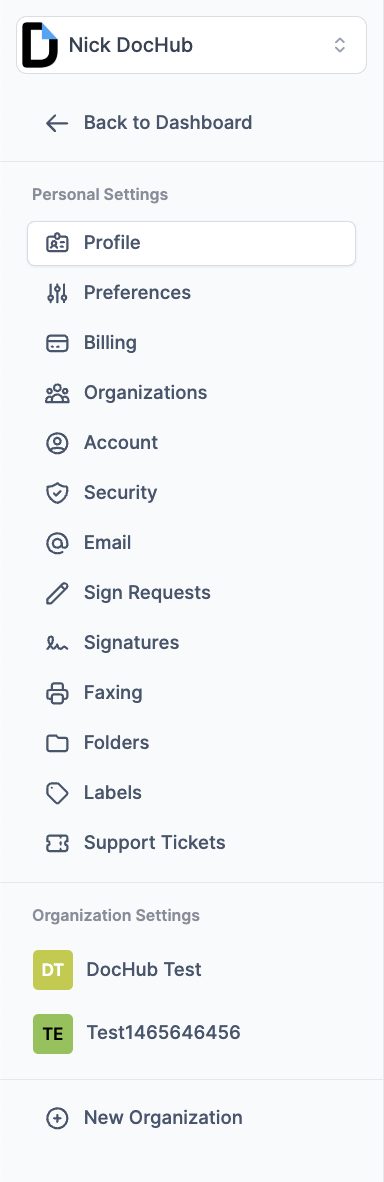
Each of our users has an opportunity to adjust their account settings according ot their preferences. Let’s review each section of those settings and see what can be done.
Profile
In profile settings, you can change your account name and domain, set your account visibility, and customize the account by uploading a logo or changing the default background colors.
https://dochub.com/settings/profile
Preferences
Preferences allow you to set up a date format for your date fields and select the time zone according to your physical location.
https://dochub.com/settings/preferences
Billing
In the Billing settings, you can cancel your subscription when you decide to stop using paid subscription features, upgrade or downgrade your subscription duration or type of plan, link the payment method to your account in order to start the subscription, add the billing address to your account, and also manage your FaxLine subscription. You can also find the section with the upcoming Invoice that will show you previous and upcoming renewal charges according to your subscription.
https://dochub.com/settings/billing
Organizations
In these settings, you can manage your existing organization accounts or create a new one and invite new members into it. For more information, please check: Creating a DocHub Organization
https://dochub.com/settings/organizations
Account
Account settings and details allow you to link different email addresses to your account and set them up as a primary, set up an integration between your Google and DocHub accounts, and you can completely destroy your account and remove it from our servers. For more information about account deletion, please check: How do I delete my DocHub account?
https://dochub.com/settings/account
Security
On this page, you can change your DocHub login password, set up Two-Factor Authentication, and also check the list of devices that have logged into your account and revoke them, if necessary.
https://dochub.com/settings/security
In the email settings, you can change your Email Text Signature and Custom Legal Footer by creating your own custom messages when you send the document as an attachment via email. This page also allows you to check the Outbound Email History for all of your email submissions and see the status of their delivery.
https://dochub.com/settings/email
Sign Requests
Sign Request settings allow you to customize particular options for all of your future submissions, such as setting up reminders for your request, setting up the expiration date for the request due to inactivity, adjusting the default signing order, creating a custom Sign Request subject and message, and some additional options.
https://dochub.com/settings/sign-requests
Signatures
This page gives you an opportunity to create your own signatures and initials without entering the DocHub Editor.
https://dochub.com/settings/signatures
Faxing
The faxing settings pages allow you to get a Provision Inbound Fax Number by creating a subscription to the FaxLine, and you can also check the Outbound Fax History here.
https://dochub.com/settings/fax
Folders
On this page, you can manage an existing folders or create a new one, which will help you organize documents in your account.
https://dochub.com/settings/folders
Labels
Create labels that you can later apply to documents, sign requests, or templates to better organize your documents.
https://dochub.com/settings/labels
Support Tickets
This page will transfer you to the Help Center, where you can submit a ticket to our support team and receive immediate assistance regarding your request/concern.
https://help.dochub.com/tickets